Unmounting drives en masse with AppleScript
I recently switched to using a Mac full-time. I wanted to escape from Windows and all the hassles that come with it, and I'll write about that soon, For now though, please enjoy this piece about a handy litte facet of macOS that makes my life a lot easier.
Mac users have undoubtedly experienced macOS's paranoia about ejecting (or "unmounting") external drives. As someone who recently made the switch from Windows, it was a bit worrying to see various warnings pop up in my notification centre about how the drives attached to my docking station were not ejected properly after I unceremoniously yanked the Thunderbolt cable from my MacBook.
This behaviour doesn't exist in Windows -- at least, it hasn't since early versions of Windows 10 (v1809 to be exact), when Microsoft updated the default USB policy to "Quick Removal" rather than "Better Performance". This meant that users could just yank the drive out without borthering to eject it first. Mac users don't have that luxury, and It was one of the many thing I wasn't aware of before making the switch.
If you're dealing with only one drive at a time, this really isn't a problem. Unmounting the drives is as simple as clicking the "unmount" icon to the right of the drive name in Finder. However, it can get a little cumbersome when dealing with many drives at once, as I often do. In fact, my regular usage sees three external drives connected at any one time -- one of which is my Time Machine backup. It's not a difficult thing by any means to unmount all of these drives, but it's something I forget to do often enough when taking my MacBook out of the house that I decided I needed a tool to help me do it more efficiently.
Enter AppleScript.
AppleScript is a really handy high-level scripting language built into macOS, and it can be used to automate almost any functions of macOS itself. I had heard about if before (and truth be told, it was one of the reasons for me to switch in the first place), and I figured it would be the perfect way for me to eject all my drives at once.
With a little help from reddit and ChatGPT, I was able to learn enough to write a script in about half an hour, and made this:
tell application "Finder"
	if exists disk "Disk 1" then
		eject disk "Disk 1"
	end if
	if exists disk "Disk 2" then
		eject disk "Disk 2"
	end if
	if exists disk "Time Machine" then
		eject disk "Time Machine"
	end if
end tell
This script works like this. Firstly, the tell command calls the application you specifically name (Finder, in this case) to do a specific task, denoted by the indented line below the tell command. The task here is to check that a disk object exists within Finder that uses that particular name using a simpel if statement. If it exists, eject it. If not, move on to the next line.
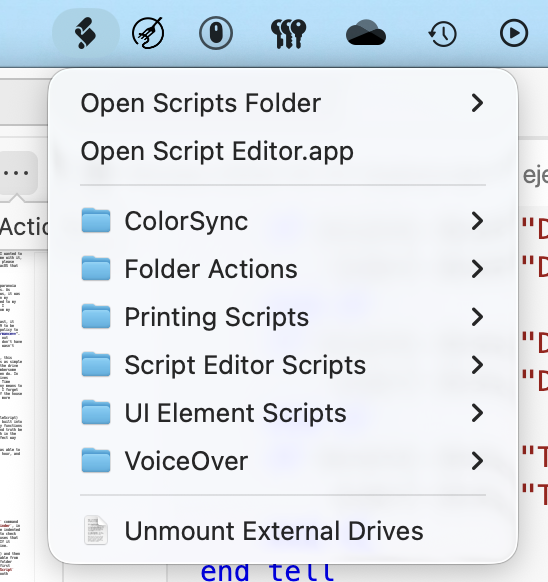
This little automation can then be saved (Cmd+S) and then compiled (hammer icon). Then, to make it accessable from the menu bar, I put it in the User Scripts folder (under /Users/usr/Library/Scripts). I had to first change the Script Editor settings to show the Script Menu in the menu bar, but after that, it was smooth sailing. The script itself appears at the bottom of the script menu, and clicking on it makes it run. With this, I can quickly and easily unmount all the external drives that stay attached to my docking station without needing to drag the drive icons on the desktop to the trash.